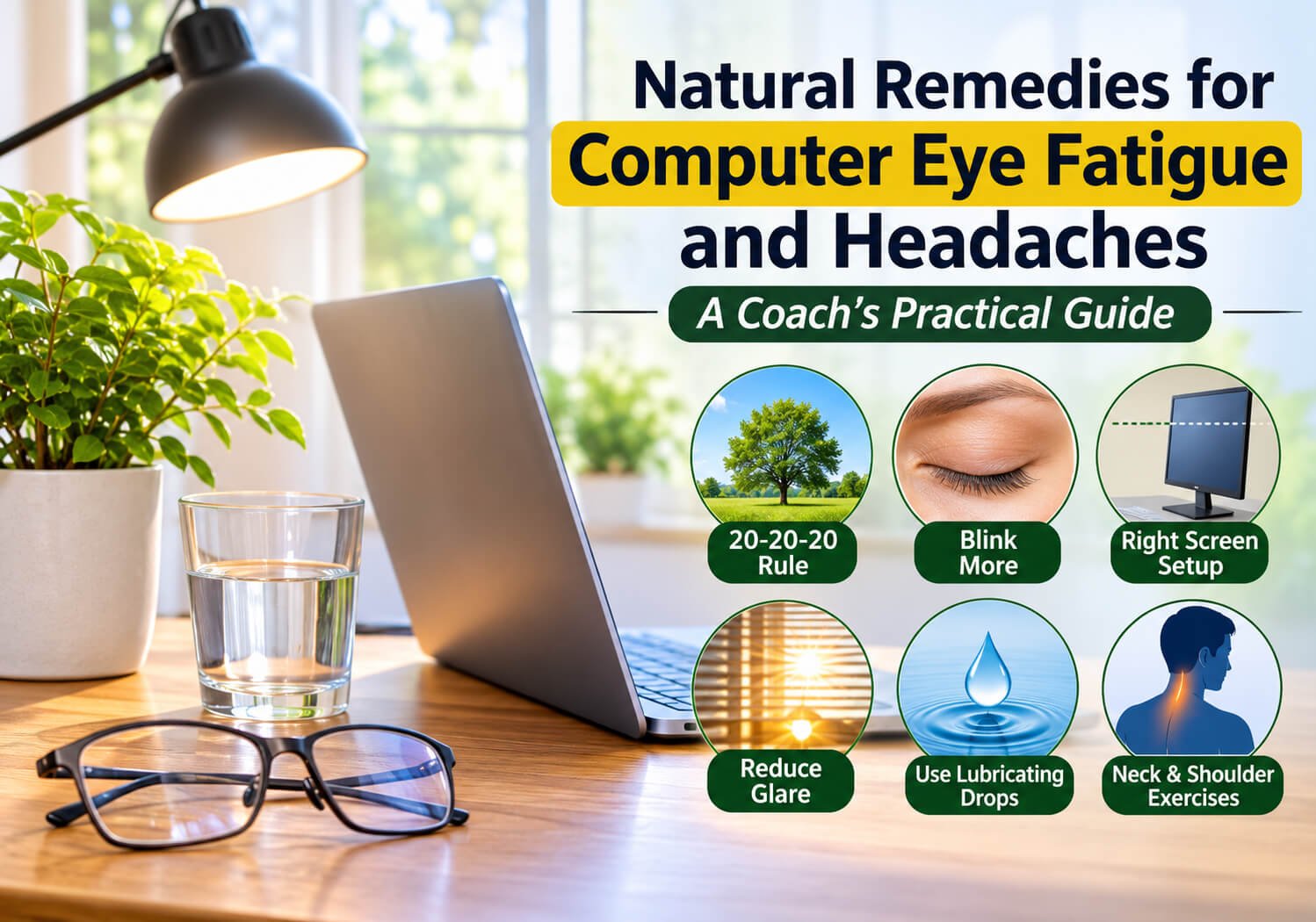
Eyes that burn, blur, or ache after a long workday are one of the most common complaints among people who spend hours at a screen. Computer eye fatigue and the headaches that often come with it are usually caused by how long you focus up close, how seldom you blink, and how your body is positioned. The good news is that you can fix many of these causes with simple habits. Over the years of coaching people who sit for long stretches, I have found that small, consistent changes often make the biggest difference. This guide covers the natural remedies that have the most support, how to apply each one, and the warning signs that mean you should see a doctor.
Quick Answer
The most effective natural remedies for computer eye fatigue and headaches are taking regular breaks using the 20-20-20 rule, blinking more often, placing your monitor at the right distance and height, reducing glare, using lubricating drops, and doing neck and shoulder mobility work. Headaches that come with vision loss, sudden severe pain, or eye pain should be checked by a doctor right away.
Why Screens Cause Eye Strain and Headaches
Your eyes do a lot of work when you read a screen. The ciliary muscles inside your eye have to hold focus at one distance for a long time, and the eye muscles have to keep your gaze locked on small text. Research on digital eye strain suggests that these sustained tasks are linked to tired eyes, dryness, and blurred vision.
Blinking also drops when you focus on a screen. Many people blink far less than normal, which lets the tear film evaporate faster and leaves the surface of the eye dry and irritated. The result is a gritty, burning feeling that can build into a dull headache behind the eyes or across the forehead.
Posture matters too. When your head pushes forward toward a monitor, the muscles at the base of your skull and across your shoulders work harder to hold it up. Tension in those areas can refer pain up into the head, which is why eye fatigue and neck tightness often show up together.
Coach’s Tip: Before changing anything else, spend one workday noticing when your eyes feel worst. Is it late in the afternoon? After long meetings? When text is small? Pattern-spotting tells you which remedy to start with.
1. Use the 20-20-20 Rule
The 20-20-20 rule is one of the simplest habits you can adopt. Every 20 minutes, look at something about 20 feet (about 6 meters) away for at least 20 seconds. The American Academy of Ophthalmology recommends this approach as a way to relax the focusing muscles inside the eye, .
Think of it as a micro-recovery. Your eyes do not need a long rest. They need a change in focus distance. Set a recurring timer, or pair the break with something you already do, such as refilling your water bottle or checking your phone.
How to do it:
- Set a timer for 20 minutes.
- When it goes off, stop reading the screen.
- Look out a window or across the room at something at least 20 feet away.
- Hold that gaze for 20 seconds, letting your eyes relax and your blinking return to normal.
Common Mistake: Looking at the phone during the break. A phone is also a close-up screen, so it keeps the focusing muscles working. Use the break to look far away.
Regression (easier): Take a 20-second break every 30 minutes.
Progression (harder): Pair the rule with a 60-second walk every hour. This also helps your neck and hips.
2. Blink Deliberately
You blink roughly 15 to 20 times a minute at rest, but that rate can drop noticeably during screen work. Consciously blinking helps spread fresh tears across the eye surface.
Try a slow, full blink: close your eyes gently for a second, then open them. Repeat this five to ten times every time you take a break. Some people find it helpful to place a small sticky note at the edge of the monitor as a reminder.
What it should feel like: a smooth, comfortable closing of the lids, not a squeeze. If your lids feel heavy or your eyes sting, you may be straining to keep them open, which is a sign to take a longer break.
3. Set Up Your Screen Distance and Height
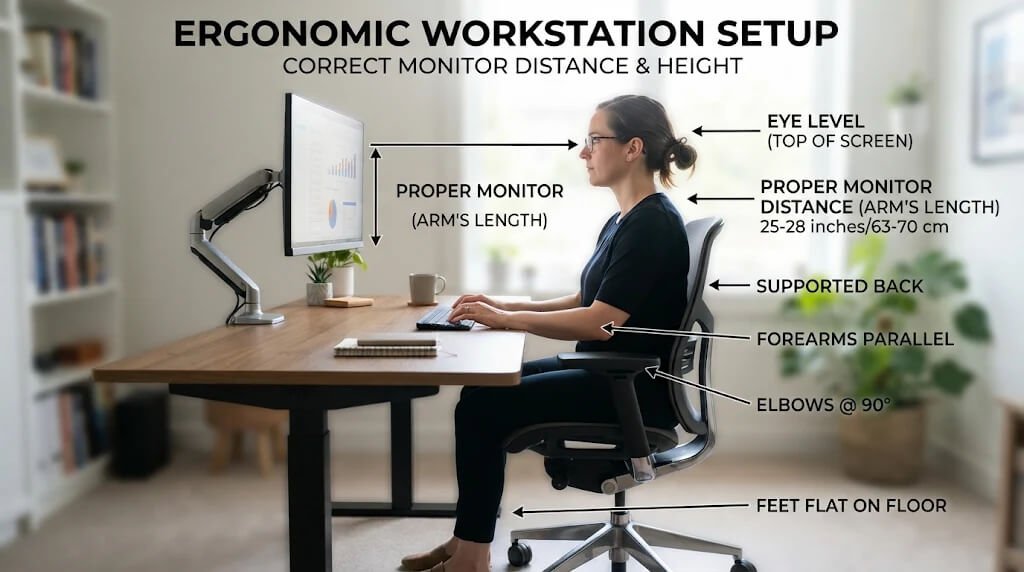
Your monitor setup is one of the most overlooked causes of eye fatigue. Most eye care guidance suggests placing the screen about an arm’s length away, roughly 20 to 28 inches (50 to 70 cm), .
The top of the screen should sit at or just below eye level. If you look up at the monitor, your eyelids open wider and your eyes dry out faster. If you look down, your neck bends forward and the strain moves into your shoulders.
Setup checklist:
- Screen distance: about 20 to 28 inches (50 to 70 cm) from your eyes.
- Top of the screen: at or slightly below eye level, roughly 2 to 4 inches (5 to 10 cm) below your eyes.
- Text size: large enough that you can read it without leaning in.
- Keyboard and mouse: close enough that your elbows stay near your sides.
Coach’s Tip: A monitor riser, a stack of sturdy books, or a monitor arm is an inexpensive fix. You do not need new equipment to make the change.
4. Reduce Glare and Adjust Lighting
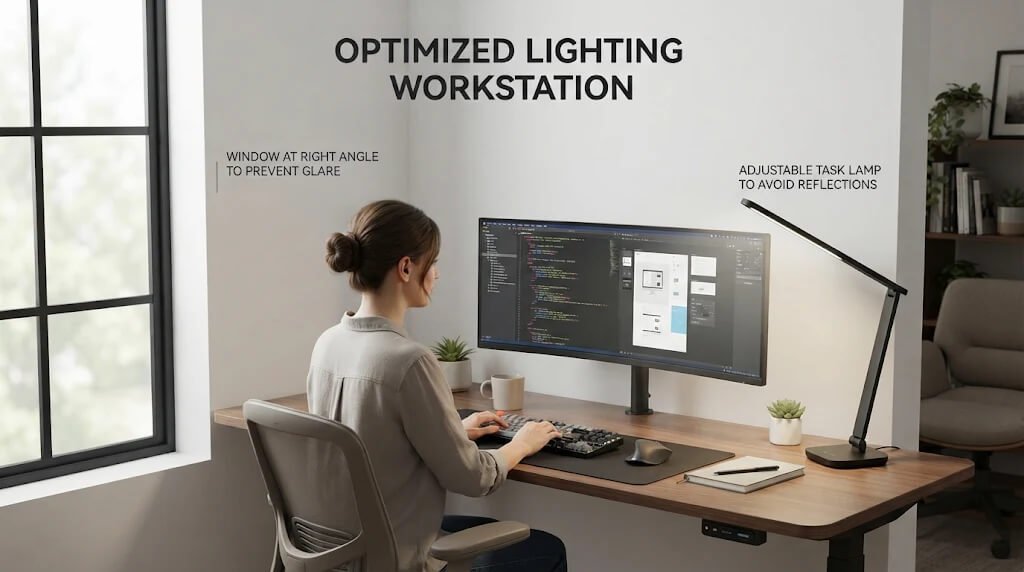
Glare forces your eyes to work harder to see text clearly. Bright windows directly behind or in front of a screen, and overhead lights reflecting off the display, are common culprits.
Start by positioning your desk so the screen sits at a right angle to windows. If that is not possible, use blinds or curtains to control daylight. Match your screen brightness to the room; a bright screen in a dim room is just as tiring as a dim screen in a bright room. Many devices include a night or warm mode, which some people find more comfortable in the evening, though research on whether it reduces strain is still mixed.
Anti-glare screen filters can help if you cannot move your setup. Check the product specifications and verify that the filter is designed for your monitor size .
Common Mistake: Turning the screen brightness all the way up to compensate for glare. This increases contrast strain. Adjust the room lighting first, then fine-tune the screen.
5. Use Lubricating Eye Drops and Improve Air Moisture
If your eyes feel dry, over-the-counter artificial tears are one of the most practical natural remedies. These are lubricating drops, not medications, and they work by supplementing the tear film. Look for preservative-free single-use vials if you plan to use drops more than four times a day.
Dry indoor air, especially from heating or air conditioning, makes dryness worse. A small humidifier near your desk can help. Keeping a glass of water nearby also reminds you to drink, which supports overall tear production.
Ask a pharmacist or eye doctor before using drops if you wear contact lenses, have frequent eye infections, or have been told you have a chronic eye condition. Stop using any drops that cause redness, irritation, or pain that does not improve.
6. Add Neck and Shoulder Mobility Work
Because posture and headaches are so closely linked, a short mobility routine can help ease the tension that builds during the day. Coaches often treat this as preventive work. Do these moves during your 20-minute breaks and you will be surprised how much tightness they release.
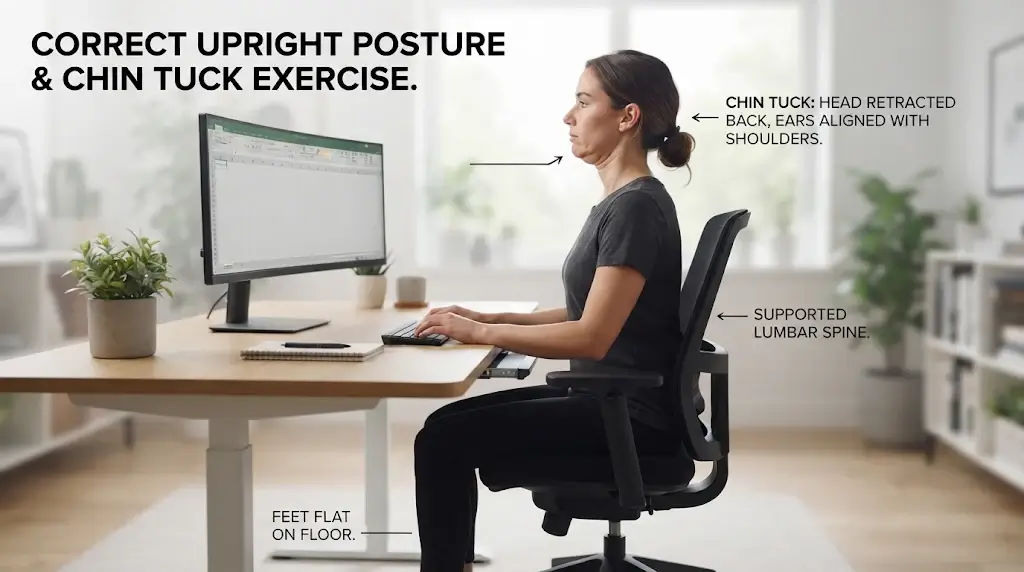
Chin Tuck (Neck Reset)
- Sets and reps: 2 sets of 8 to 10 reps, holding each for 3 seconds.
- How to do it: Sit tall. Slide your head straight back, as if making a double chin, without tilting it up or down. Hold, then return to neutral.
- What it should feel like: A gentle stretch at the base of the skull and back of the neck. It should not pinch.
Doorway Chest Stretch
- Sets and reps: 2 sets, holding 20 to 30 seconds per side.
- How to do it: Place your forearm on a door frame with your elbow at shoulder height. Step forward gently until you feel a stretch across your chest and front shoulder.
- What it should feel like: A steady stretch in the chest and front of the shoulder, without sharp pain.
Shoulder Blade Squeeze
- Sets and reps: 2 sets of 10 reps, holding each for 3 seconds.
- How to do it: Sit tall and gently draw your shoulder blades back and down, as if sliding them into your back pockets.
- What it should feel like: A light activation between the shoulder blades.
Regression (easier): Do only the chin tucks and shoulder squeezes, one set each.
Progression (harder): Add a 30-second upper trapezius stretch on each side, tilting your ear toward your shoulder while keeping the opposite shoulder down.
Coach’s Tip: Stop any stretch that causes numbness, tingling, or sharp pain. Mild tension is normal; pain is not the goal.
7. Support Hydration, Sleep, and Caffeine Habits
Your eyes rely on a steady supply of tears, and your overall hydration affects how well your body makes them. Dehydration can make eye dryness and headaches worse, so keep water within reach. Research on hydration and headaches has found that low fluid intake can be a trigger for some people .
Poor sleep also lowers your tolerance for visual strain. Many people find that eye fatigue is worse after a short night. Aim for consistent sleep, and avoid looking at screens right before bed, since bright light can make it harder to fall asleep.
Caffeine has a dual effect. A moderate amount can help you stay alert, but too much can contribute to headaches, jitteriness, and disrupted sleep. If you rely on caffeine to push through afternoon fatigue, spread your intake earlier in the day and watch how you feel. For more on sustainable energy, see how to improve daily energy without caffeine.
8. Consider Nutrients for Eye Health, With Caution
Some nutrients are involved in normal eye function, and you may have heard about supplements for screen-related eye strain. The evidence here is more limited than for the habits above, so treat supplements as a secondary option.
Lutein and zeaxanthin are carotenoids found in leafy greens such as spinach and kale, and they are present in the macula of the eye. Studies have explored whether they support visual performance, particularly in people with high screen use, but results are mixed . Omega-3 fatty acids are linked to eye surface health in some studies, although research on dry eye has produced varying results .
Whole foods are the safest starting point. Eat leafy greens, fish such as salmon or sardines, eggs, and colorful vegetables regularly. If you are considering a supplement, talk to your doctor first, especially if you take blood thinners, are pregnant, or have another health condition.
Common Mistake: Assuming that a supplement can replace breaks and posture changes. Supplements do not fix a setup that forces your eyes and neck to work hard all day.
When Eye Headaches Need Medical Care
Natural remedies are appropriate for everyday eye strain and mild tension headaches. Some symptoms need prompt medical attention. Contact a doctor or eye care professional promptly if you have any of the following:
- Sudden, severe headache, especially the worst you have ever had
- Vision loss, double vision, or a sudden change in your visual field
- Eye pain with nausea, vomiting, or light sensitivity
- Headache with fever, stiff neck, confusion, weakness, or numbness
- Headaches that are getting worse or waking you up at night
- Redness, discharge, or swelling in or around the eye
- Eye symptoms that do not improve after two weeks of changes
Emergency symptoms, such as sudden vision loss or a sudden severe headache with neurological changes, require immediate emergency care.

Putting It All Together: A Sample Workday Plan
You do not need to do everything at once. Here is a simple plan that combines the remedies above into a workday.
Morning setup (once): Adjust your monitor distance and height, check glare, and place water within reach.
Every 20 minutes: Apply the 20-20-20 rule and blink slowly five times.
Every hour: Stand up, walk for about a minute, and do the chin tuck and shoulder blade squeeze.
Midday: Do the doorway chest stretch and drink a full glass of water.
Late afternoon: Check your eyes. If they feel dry, use preservative-free artificial tears, and reduce screen brightness if the room has changed.
Evening: Dim screens an hour before bed and aim for consistent sleep.
Most people notice a difference within a week when they follow this plan consistently. If symptoms persist, keep a short log of when headaches happen. That record is useful for your doctor or eye care professional.
Frequently Asked Questions
Does blue light cause eye strain?
Blue light from screens is often blamed for eye strain, but research has not clearly shown that it causes damage at typical screen levels. Most eye fatigue comes from focusing fatigue, reduced blinking, and glare. Changing your habits usually helps more than blue light filters alone.
How often should I take screen breaks?
A common approach is the 20-20-20 rule: every 20 minutes, look at something about 20 feet away for 20 seconds. Longer breaks every hour help your neck and shoulders as well.
Can computer glasses help with headaches?
Some people find that glasses made for computer use help them focus at screen distance, especially if they have an uncorrected vision issue. An eye exam is the best way to find out whether you need them. Do not buy them just because they are marketed for screens.
Are artificial tears safe for daily use?
Preservative-free artificial tears are generally considered safe for frequent use, but check with a pharmacist or eye doctor if you wear contacts or have an existing eye condition. Stop using any drops that cause pain or redness.
Why do my eyes hurt after working on a computer?
Eye pain after screen work is usually related to focusing strain, dryness, glare, or poor posture. If the pain is severe, sudden, or comes with vision changes, see a doctor promptly.
When should I see a doctor for eye headaches?
See a doctor if headaches are sudden and severe, come with vision changes, or do not improve after a few weeks of healthy habits. An eye exam can rule out vision problems that need correction.
Conclusion
Computer eye fatigue and headaches are often the result of long focus, dry eyes, poor screen setup, and tight neck and shoulder muscles. The most effective natural remedies are the habits that address these causes directly: the 20-20-20 rule, deliberate blinking, a better monitor setup, reduced glare, lubricating drops, neck and shoulder mobility, and steady hydration and sleep. Supplements may play a supporting role, but they work best alongside these habits. Start with one or two changes this week and build from there.